
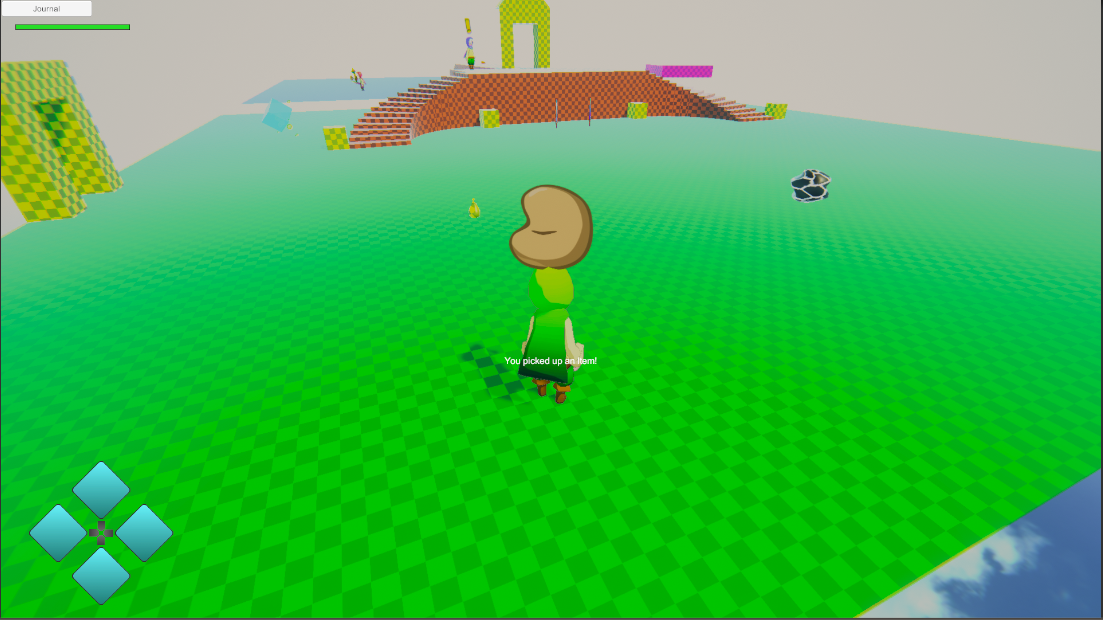
Phae Project Dev Log 6: Pouch Items and Game Menu
Dev Log 6
This week I mostly worked on the pouch items and the Game menu. I struggled a lot with a problem caused by the InventoryBase class from UCC. I focused so much on the inventory and UI I didn’t have time to make the character abilities I wanted. Hopefully next week will be better.
Here is the breakdown of this week:
Wednesday : 2h
I would like to use my items without having to always open the main menu. I would like to use items during the combat without breaking the flow by pausing the game. That’s why I will implement the pouch of consumable items. Using the D-pad (num. on keyboard) I will be able to use items in battle. This means I also need to create a special menu when pressing ”start” in combat, with reduced options (example not be able to use items from the menu, only equip to pouch).
So first I added an array of consumableItemTypes in my inventory which will store my pouch items. I then made a UI element that updates whenever an itemType in the pouch is added/removed/updated. I do this using the Event system from Opsive TPC/UCC.
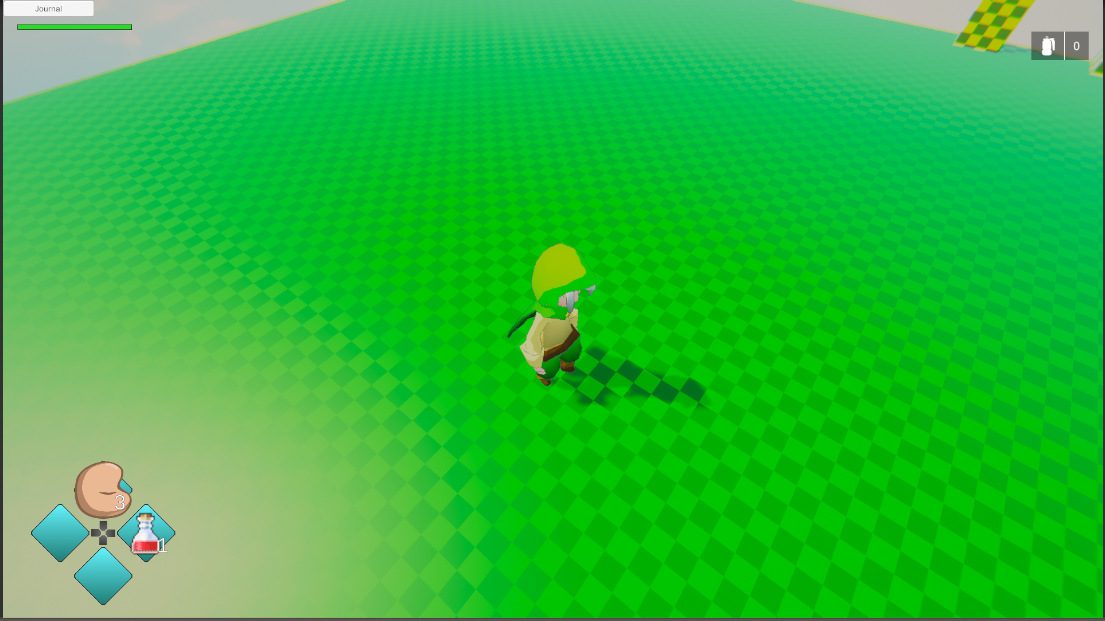
On Thursday I will add the code to “equip” consumable itemtypes in the pouch and write a character ability to use the pouch items, with an animation (later I’ll add VFX).
Thursday : 4h
As I had planned I was able to make a UI to equip my pouch items. I used the Eventhandler a lot to update things at the correct this. To equip an item to the pouch you must open the main menu and go to the equip window. Then click on the pouch tab and click on the pouch index you would like to equip the item to. This opens a scrollable window with a list of all the characters consumable items. I used lambda functions and delegates to pass a function as a parameter to the function that instantiates the consumableItemType buttons.
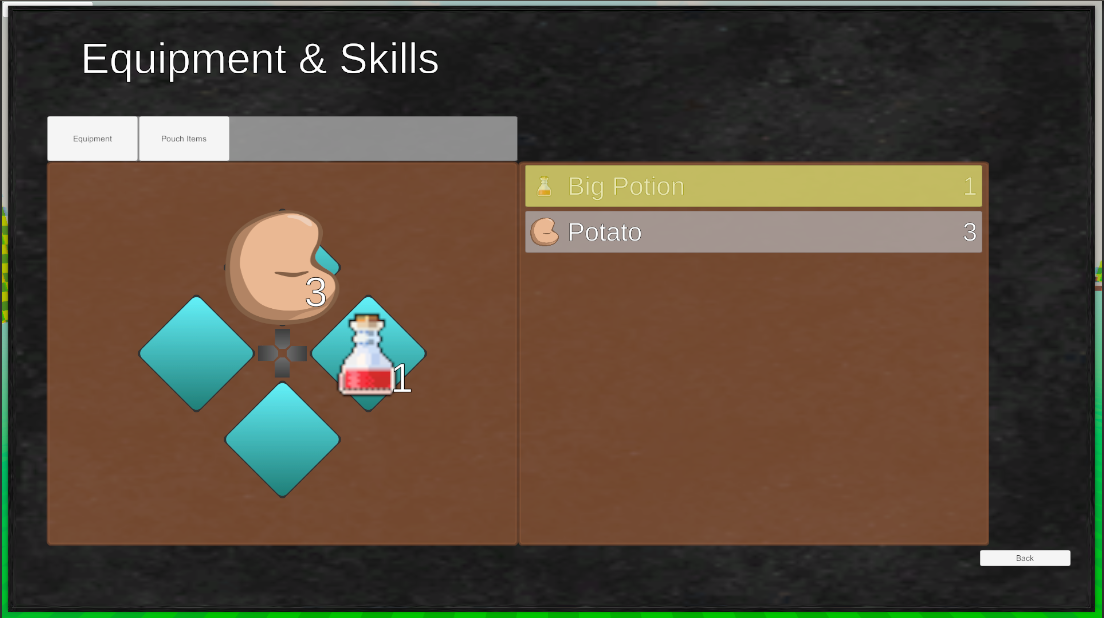
I followed by creating an ability (Abilities are used by TPC to extend the character locomotion) to use my pouch items. After a few hours of debugging and trial and error I was able to make it work. My inventory and UI code is a complete mess though… I will need to think hard about how I should structure these so that my code is clean and easy to debug. Especially the UI windows, tabs, pop up, etc..
Friday : 6h
On Friday I decided to look into how I could organize my inventory/UI code in a more flexible and scalable way. The first thing I did was create a enumarator for eventNames. TPC uses strings to register/unregister/execute events, which I do not really like because it makes it hard to find what function is subscribed to an event. So at least I replaced the event string names that I use, by the event names enumerator I made. I use the “nameof” operator to convert the enum to a string at compile time so it should not have any affect on the games performance, it just makes my life easier.
nameof(MyEnum.EnumValue); // Ouputs > "EnumValue"I also created a static class with static function that finds my player scripts without the need to always execute “FindGameObjectWithTag(“Player”)” or “GetComponent
namespace SleepingPenguinz.PhaeProject.OpsiveUCCSupport
{
    public static class UCCUtility
    {
        static private GameObject m_charGameObject;
        static private UltimateCharacterLocomotion m_characterLocomotion;
        static private RPGInventory m_playerInventory;
        static private AttributeManager m_PlayerAttributeManager;
        static private ItemSetManager m_PlayerItemSetManager;
        static private ItemCollection m_PlayerItemCollection;

        public static GameObject GetPlayerCharacterGameObject()
        {
            if (!m_charGameObject)
            {
                m_charGameObject = GameObject.FindGameObjectWithTag("Player");

                if (!m_charGameObject) {
                    Debug.LogError("The Player Character Does not exist in the scene! Please make sure the player is in the scene before accessing its components");
                }
            }
            return m_charGameObject;
        }

        public static RPGInventory GetPlayerInventory()
        {
            if (!m_playerInventory)
            {
                m_playerInventory = GetPlayerCharacterGameObject().GetComponent<RPGInventory>();
            }
            return m_playerInventory;
        }

        public static AttributeManager GetPlayerAttributeManager()
        {
            if (!m_PlayerAttributeManager)
            {
                m_PlayerAttributeManager = GetPlayerCharacterGameObject().GetComponent<AttributeManager>();
            }
            return m_PlayerAttributeManager;
        }

        public static ItemSetManager GetPlayerItemSetManager()
        {
            if (!m_PlayerItemSetManager)
            {
                m_PlayerItemSetManager = GetPlayerCharacterGameObject().GetComponent<ItemSetManager>();
            }
            return m_PlayerItemSetManager;
        }

        public static ItemCollection GetPlayerItemCollection()
        {
            if (!m_PlayerItemCollection)
            {
                m_PlayerItemCollection = GetPlayerItemSetManager().ItemCollection;
            }
            return m_PlayerItemCollection;
        }
    }
}
I will most likely add functions to this class whenever I have components on my player character that I would need to reference to.
After some reflecting on the inventory I realised something was missing. There was no way for me to have itemTypes with upgrades. The only way for me to have upgrades was to duplicate an itemType and modify some values, this would have been a bit a a problem if I ever decided to change the name, icon or any of the common attributes, I would have to make the change on all the upgrades. Instead of storing itemTypes, my inventory will now store a list of “InventoryItem” a new class that contains an itemType and the amount stored of that item type. For upgradeable itemTypes I have an extension (InventoryItemUpgradeable) that contains an upgrade enum value. I will use the itemType and upgrade as a double key of a dictionary. I’m thinking that I can have a max of 5 upgrades, I used the naming from Fantasy Life, a 3DS game I enjoyed a lot (Normal, good, great, Top, Divine). Do keep in mind that the upgrade and rarity are separate things. A weapon with rarity 2 and upgraded to “Top” might be better than a “Normal” weapon of rarity 3.
Saturday : 6h
I tried to refactor the inventory code with the changes I mentioned above and I came across a ton of limitation from the InventoryBase class offered by Opsive. The structure is designed to have one ItemType per item, It took me the entire day to modify the code and there are still a lot of bugs in the new implementation. I still use the inventoryBase functions…most of them cannot be overriden. Since I do not think this can be resolved without changing the Opsive source code I will wait until I get some answers from the forum. Until then I made it so that I can keep the new code I wrote and still have the game be playable. I added a lot of log warnings everywhere that in the code to make sure I do not forget which functions I will need to change in the future once I know whether or not I will be able to fix my issue without changing the source code.
Sunday : 4h
I continued to fix (more hacks than real fixes) some issues I had with the inventory to make sure the game would not crash. While I wait for the forum answers, I decided to write some code for the UI, hopefully I won’t have too many problems…at least I am writing this from scratch so I can expose whatever I need from each class.
Here is how I am going to break it up:
- GameMenuUI
- The top class that encapsulates everything
- PageUI
- The class that is used to manage my menu pages. Example Main Menu, Items Menu, Equipment & skills Menu, etc. Only one page can be active at a time. The GameMenuUI will make sure to “close” the other pages, once you open a new page, it also keeps reference to the previous opened page
- WindowUI
- The class that encapsulate the buttons. If a window is “focused” only the buttons inside can be navigated to. It will keep a reference to the previously focused window. If the window is part of a page then opening the window will activate its page
- TabBarUI
- Tabs are used to switch windows. Tabs are simply toggle UI elements linked to a window and the TabBar is a essentially a Toggle Group. Only one toggle (tab) can be “ON” at a time. The tab bar makes it so the toggles in the toggle group can be easily navigated, using public functions.
- WindowButtonUI
- The buttons in a window
- PopUpWindowUI
- A window that pops up, example a yes/no prompt, or a choose item scrollable view. It is a window that returns an object reference to whatever opened it
These would be the base of my menu UI system and I will extend them for any UI element that need it. I am not completely sure if I want to make them all as classes or make some of them as interfaces.
I only had the time to write the TabBarUI class.
Monday: 7h
The forum answer was not helpful but I thought of way to work around the problem. I do not know if It will work yet, but it might. Essentially the problem is that InventoryBase uses ItemTypes as keys to deal with items. So I am thinking I might procedurally create these itemTypes from the data of the inventoryItem I am trying to add to my character. I would have one ItemCollection for my itemTypes in the inventoryItems and one itemCollection with the procedurally created “instanced” itemTypes that are added to my character. I asked on the forum what they thought about my new idea, in the meantime I’ll focus on UI.
I took all day writing the different classes I mentioned above. I was not able to test it out yet though. Hopefully I will be able to finish it on Tuesday
Tuesday: 8h
On Tuesday Justin from Opsive contacted me directly so we could discuss my issues with the current inventory system in UCC. After a long conversation he thought of good solution that won’t need the change of all the source code. I am not completely sure how he will implement his solution but I look forward to it. He did say that it would take months since he has other things that are higher priority. Therefore I will focus on other parts of my game in the meantime. For now I will keep my inventory as simple as possible and I’ll modify it once Justin adds the update I need.
Right now I am focussing on the UI and making it flexible and scalable. Running a few test on the classes I wrote on Monday I realised there were bugs a bit everywhere. After thinking it through a bit more I got a good sequence of opening pages and windows.
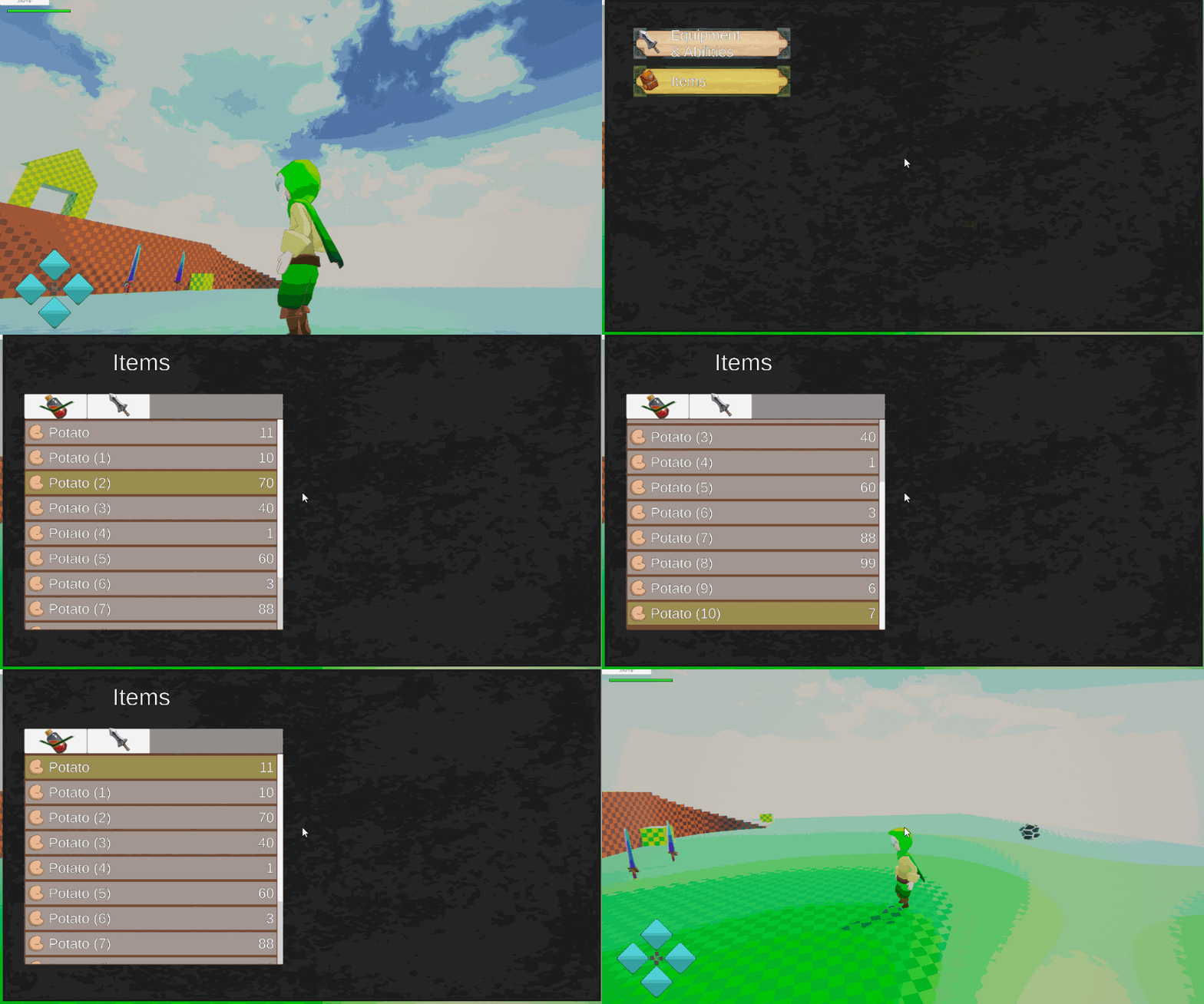
I will need to work a lot more on the UI before I can have all the functionality I want. For now I only have a scrollable itemList which can retrieve items from the inventory with a filter, for example retrieve only items with consumable category. I had that functionality before but it was hard coded, now it is much nicer and flexible. Also I can now scroll through the list using arrow keys. Here is the function I use to make sure the selected button stays inside the scrollView:
public void SnapTo(RectTransform target)
        {
            Canvas.ForceUpdateCanvases();

            Vector2 newPos = (Vector2)scrollRect.transform.InverseTransformPoint(transform.position)
                - (Vector2)scrollRect.transform.InverseTransformPoint(target.position);

            float margin = scrollRect.viewport.rect.size.y/2f - ((RectTransform)m_ButtonPrefab.transform).rect.height - 20;
            float signedDiff = contentPanel.anchoredPosition.y - newPos.y;

            if (Mathf.Abs(contentPanel.anchoredPosition.y - newPos.y) > margin)
            {
                if(signedDiff < 0)
                {
                    contentPanel.anchoredPosition = newPos - new Vector2(0,margin);
                }
                else
                {
                    contentPanel.anchoredPosition = newPos + new Vector2(0, margin);
                }

            }
        }
As you can see in the gif below I can now control the UI without having to use the mouse. I can now use the keyboard or a controller as well as the mouse to control the UI.
I haven’t yet coded the feature to add any functions to the instantiated buttons. Most of the time it will pop up a window so I need to write the popUp window class first. Hopefully I can do that next week
Recap: 37h
- Added a ability to use consumable items
- Added pouch items UI and menu
- Started refactoring UI and Inventory
- Made a big mess with my inventory code
- Found a problem with the inventory base design, Justin from Opsive will fix it in a few months
- Worked a lot on the UI code to make it flexible and scalable
This week was not great… I struggled a lot with things not working the way I want them to. I had less free time than ususal to work on the game. The game was not playable for most of the week. The problem with the InventoryBase class really pushed me back in my development planning. But these things happen when you work in big projects especially with code that you haven’t written yourself.
I’ll have to persevere and not get bump down by a bad week of work. I need to focus on the things I can do right now while I wait for Justin to fix the UCC Inventory system. I am thinking that I should finish the UI and maybe start working on the combat, I’ll simply limit myself to having only one weapon per itemType for now.
Until next week!