
Phae Project Dev Log 5: Creating the character Inventory
Dev Log 5
This week I started implementing a inventory system expanding the very limited one offered by UCC (Ultimate Character Controller). I was able to add a few basic features to the inventory such as adding consumable items, weapon items, a bare bones item menu, etc … I also looked into how I would like design UX for gameplay and menus, not so much the UI.
Here is the breakdown of this week:
Wednesday : 3h
I have been thinking about how I could design the gameplay UI/UX and game menu, and it made me think a lot about all the features I want to have in the game. Here is the Gameplay UI elements:
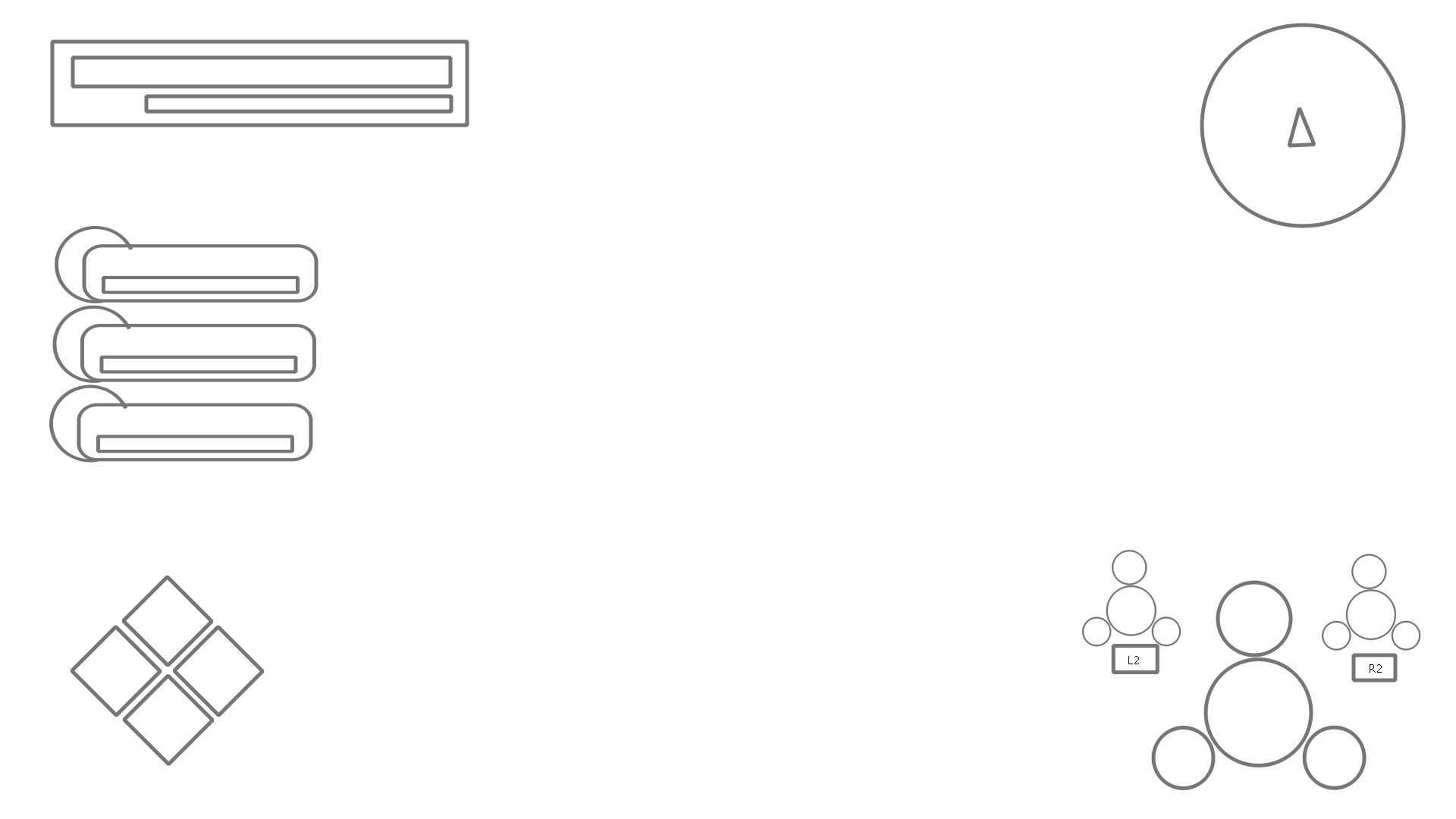
Standard Health exp bar top left, and mini map on the top right. Bottom left you got the quick items and on the bottom right you have the weapon sets which can be swapped using L2 and R2. I am not sure if I mentioned it before but weapon sets have 1 weapon, 1 phae (pet creatures) and 2 abilities. Mixing and matching the right weapon, phae and abilities will be the main factor to winning battles. The character bars on the left are for the three phae that you bring along with you (the ones equipped in your weapon sets). The dimensions of each element will most likely change once I add them in game to make sure they do not bother the player, while still being clear.
And here are the game menu elements:
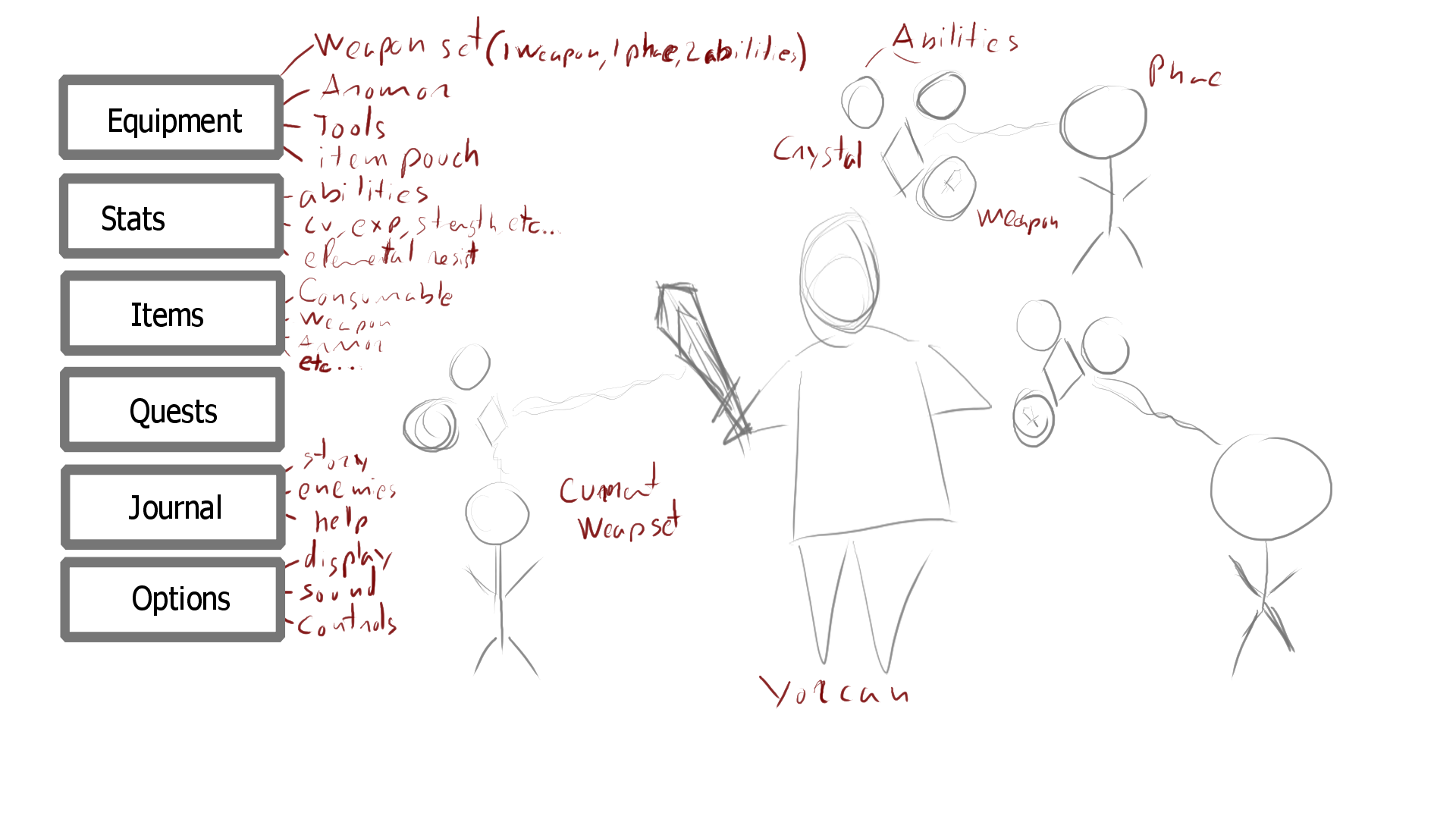
I apologize for my horrible drawing skills and handwriting. I was thinking of a list menu on the left and the characters (Yorcan, phae, maybe story characters) on the right. The characters would be in 3D, animated and showcasing the current team and weapon sets that are equipped. Once one of the menu buttons is clicked you go into a more usual menu with tabs or lists. Each menu will be laid out differently so I haven’t taken time to research exactly how they would each look.
Thursday : 4h
After a lot of debating I am leaning on making my own inventory system. It should make things simpler to maintain as it will be a custom inventory specialized to my game. I think it will also be a good experience for me to write my own inventory management solution. So I decided that my goal this week will be to create the game menu with the ability to equip a new weapon, and use a potion from the inventory. I plan to make the weapon and potion as item pickups. And if I progress enough I’ll make the weapon and potion a reward for completing a quest. Next week I can figure out how I can make the quick items and weapon sets. Hopefully TPC v2.1 will come out soon after so that I can focus on combat.
Before I start writing any code i need to make sure I understand the current infrastructure. Especially the naming conventions since they are a bit confusing. So here are the high/level definitions:
- Inventory:
- Current: A place to keep track and manage the items collected. Contains functions to add, remove, get, pickup, use items/itemTypes. Note that “picking up” an item adds it to the itemType in the inventory itemTypeCount, “adding” an item connects an “item” to the an itemType in the inventory itemTypeItemMap, and “equipping” an item changes the activeitem. This is a bit confusing
- My Extension: Needs more organizing such as having a state for soft equipped and equipped items. Also needs to spawn the items that have the equipped state on load.
- Item Categories: e.g Consumable > Potion > Health
- Current: Just an ID and Name, which is used to organize itemTypes
- My Extension: I would like nested Categories. Although I might simply have itemTypes be part of multiple categories, it might be simpler to deal with
- Item Types: e.g Big health Potion or Heavy Iron Sword
- Current: ItemTypes are used by the inventory to register how many instance you have of an itemType. It can have an array of item categories. It has an ID, a item description and a max amount.
- My Extension: Needs rarity, a function callback when the item is used (for consumable items), for weaponItemTypes I’ll have abilities, and more … I might also add Stats (strength, defence, etc..) and abilities (passive and active) as extension of the ItemType. This is unsure since I could also put them under attributes.
- Item: e.g Heavy Iron Sword
- Current: The item is a gameobject or an instance prefab, only for equippable weapon items. It is spawned on your character when the item is picked up and it is active when the item is equipped. It tells the Character controller how to deal with the item.
- My extension: I’m not sure for now but it will probably need something
So now that this is clear I can start extending the base Inventory and ItemType classes. I will also need to think about the code I will write to display and manage my inventory in the UI. I’ll try to keep the UI and Database code as separate as possible.
Friday : 8h
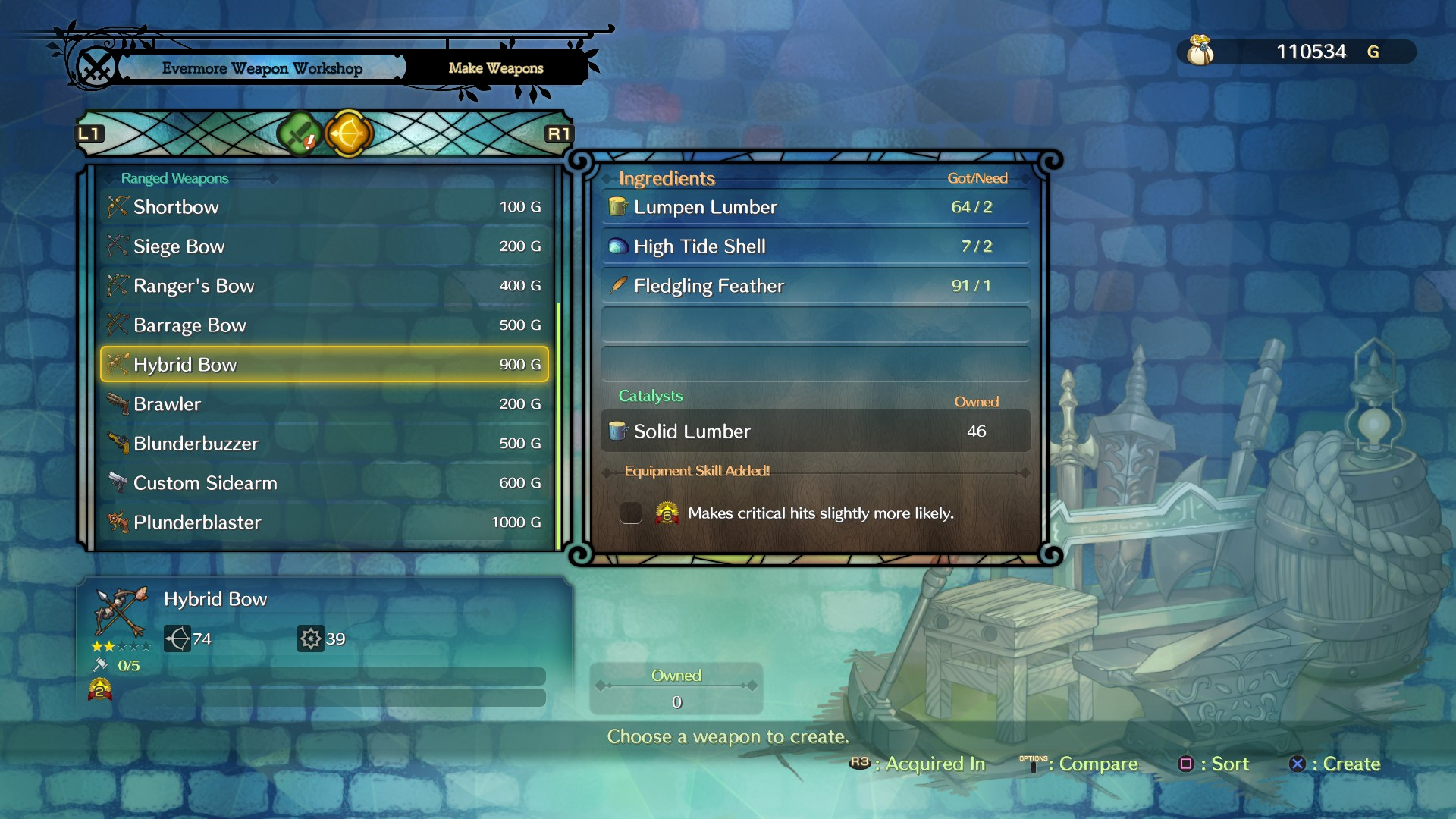
I started by creating my own Inventory class, extending the InventoryBase class from UCC. For now I haven’t changed much. I then Created a ItemTypeBase (extending the ItemType from UCC) and a ConsumableItemType, extending the ITemTypeBase. I added some fields so that I could specify an icon, rarity, etc.. For the consumables i wrote a function that gets called by the inventory when a consumable item is used. In the consumable item type I can specify any number of attribute to which I can add, subtract or restore some value. Having that done I was ready to create my “small potion” item. The problem was the ItemType Manger editor code doesn’t let me create, modify ItemType extensions. So I had to create my own itemtype editor manager. I’m not very expericend with editor code so I mostly copied the existing code and made some tweaks so that I could at least create other itemTypes. I am still unable to modify them in the editor though, it would take too long to create a custom editor for each itemtype. So for now I select the itemType instance in the Project View and modify it in the inspector (debug mode for now) With my small potion created and set up, I continued onto making the Game menu UI. I am taking Ni No Kuni II as reference since it is the game I am currently playing and the UI is simple to navigate:
I made the game menu with just two buttons and the 3D character. I haven’t looked how to display 3D object on top of a UI screen space element, so Yorcan is hidden for now. I made it very simple because I am just testing my code for now:
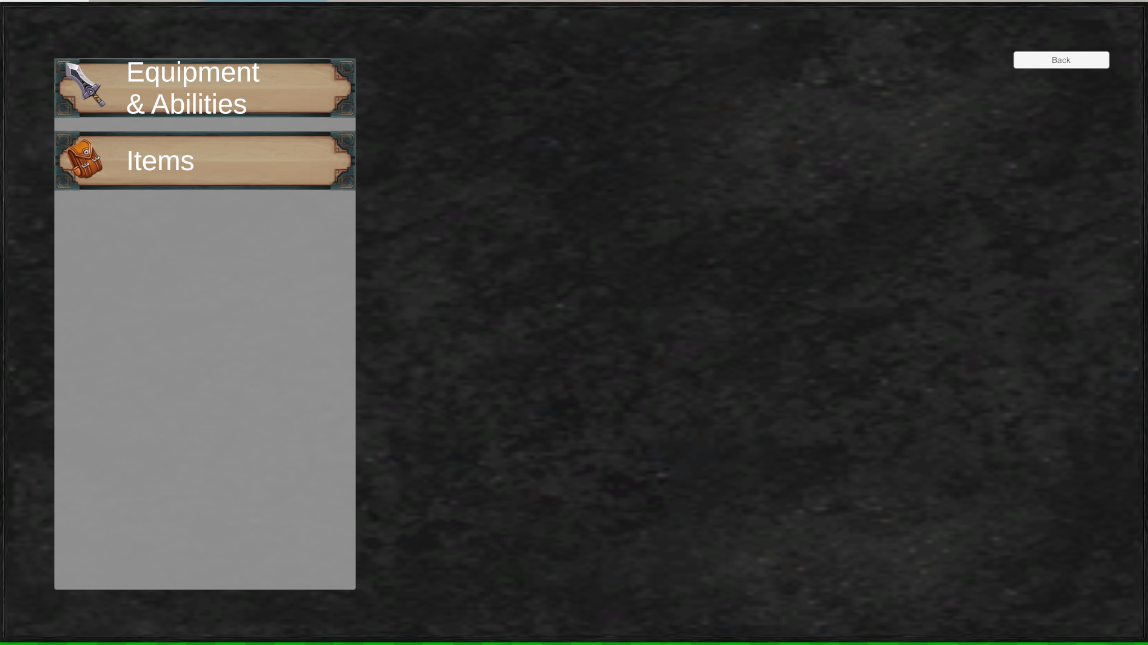
Once I click on the Items button I spawn instances of a itemUI prefab to display all my consumable items in my inventory:
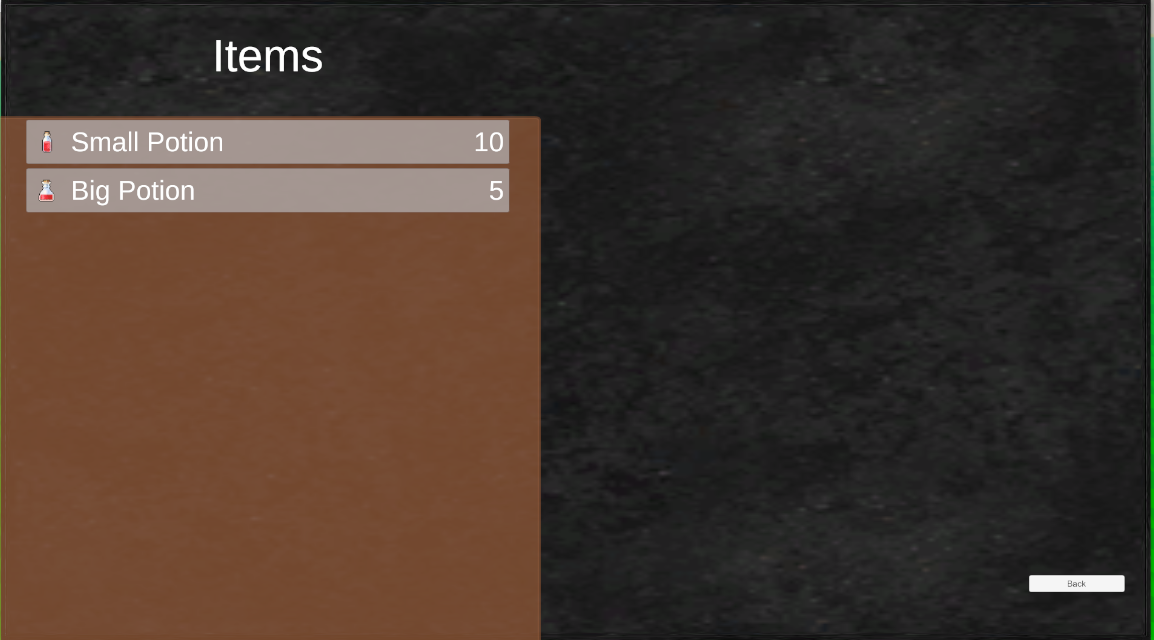
The items are buttons, which I can press to use. The potions heal the characters HP by the amount specified on the itemType scriptable object instance.
The next step will be adding tabs, which can be toggled using L1 and R1, for each item type (consumable, weapon, materials, etc..). I also need to display details such as the item description or the rarity and make the UI controller friendly.
I am pretty happy with the progress today, I was not expecting to be able to get it to work on the first try.
Saturday : 8h
I started the day by making a new sword weapon in blender. I created a WeaponItemType class and from it I made a “sky sword” and “sky katana” item type. I continued on by creating a “item” and “item pickup” for both weapons. The current behaviour is that the weapons get equipped as soon as I enter the pickup trigger. Instead I would like the item to be equipped from the inventory, for that I need to reference the item prefab in the weaponItemType. Taking the PickUpItem script as reference I was able to write a function inside WeaponItemType that adds the weapon item to the main character.
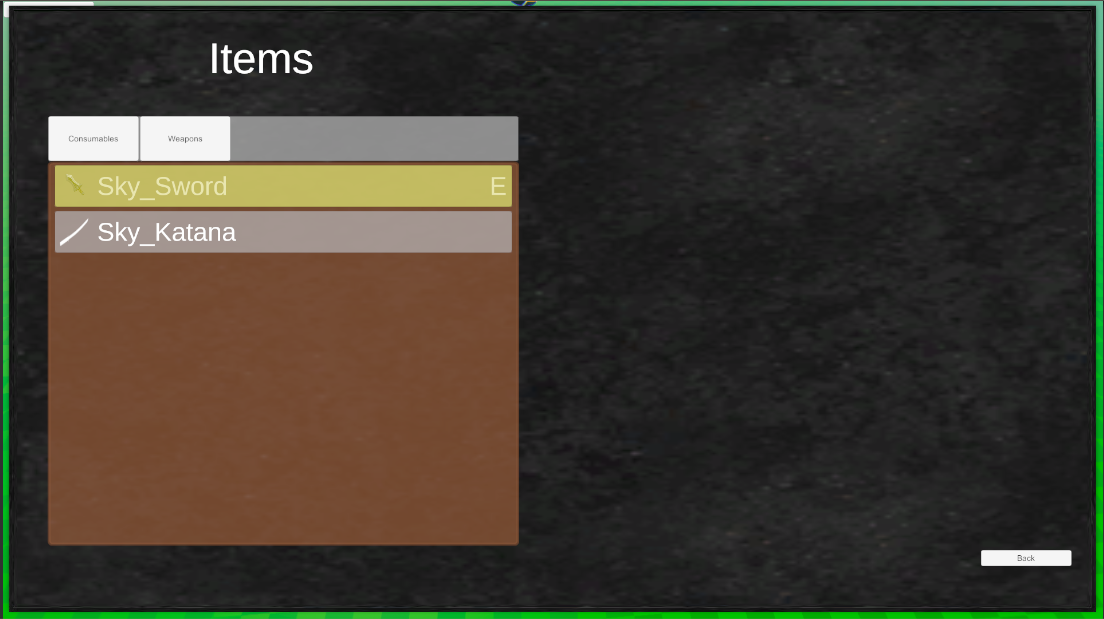
I haven’t been able to remove the items quite yet, but I hope to fix that on Sunday. I also need to fix the save/load during scene transitions because currently the itemTypes with no item do not get saved and the items do not get spawned.
Sunday : 9h
In the morning I fixed the item removal function. My code is a bit all over the place right now, I will definitely need to refactor soon before it gets out of hand. Next is getting the Save/Load to work. I use the Dialogue System integration to do that for the moment. I will need to overwrite the inventory part to suit my own inventory system.
I essentially save two things: my itemTypes and my items. Saving the entore classe would be very efficient therefore I use the ids from the itemCollection. For itemTypes I save the id and itemType count, for the items I save the itemType id and the itemSlot. Do remeber that the items are the ones added to my character (weapons), the itemTypes are the ones I have in the inventory. Using the ids I can save and load the itemTypes and items.
Now that I got a simple inventory system working i would like to work on the ways to get these itemTypes inside the inventory. Things like pickup, quest rewards, etc.. I would like to have two types of item pickups. One where you simply run over and it gets added, another where you need to interact. Currently I have the running over pickup working just fine. The interacting one would need a pop up showing the button to press to interact. This interact behavior is something i would like for everything that is interactable (pickup, talking to npc, door, etc..).
It turns out UCC already offers this “message” behaviour in its Abilities. Therefore I only had to add a world UI element above my characters head and set it up as a message monitor. The ability message can send an image and a text. I am not sure I will continue to use this technique on the long term but it works fine for now. I set it up for both my interact ability and my itempickup ability. I have issues with the itempickup ability because once it is active it never stops. I asked for help on the forums hopefully they will know if it is a bug or if I set something up incorrectly.
Here is the result so far:
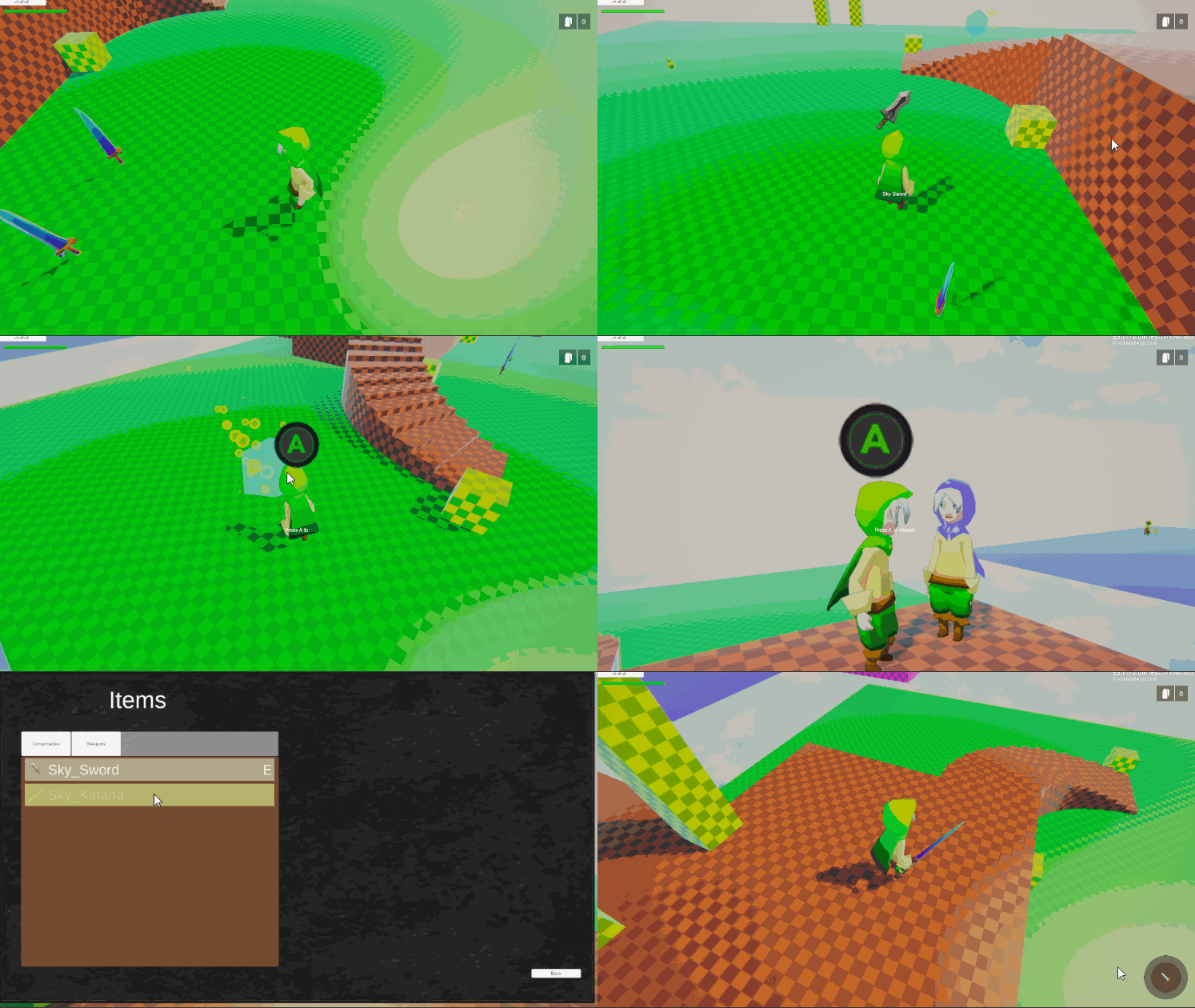
On monday I can add the quest item rewards and hopefully fix some of the issues I got so far. If I got time I’ll add some new itemTypes and have enemies drop them.
Monday: 7h
I fixed the itempickup bug I had. But unfortunatly it still has a few issues, the ability wasn’t really designed to work on a button press. So I’ll eventually make my own ability.
I went onto adding new feautres to my quest, such as giving items and getting item rewards. Quest Machine is very nicely structured and it has QuestConditions and QuestActions classes, which can be inherited to make any type of condition or action. It took a few hours to understanding how everything worked, and then I made my own AddItemTypeAction and CountItemTypeCondition. Eventually I will expand the Quests to show the item condition and rewards on the Quest UI. Currently I have to do it manually by writing the quest body text.
Next was adding item drops to my enemies. That was very simple, I simply added a script that instantiates my item and in the inspector I added a callback to the script when the enemy dies. I’ll eventually replace the instiatiatier by an object pool and swap the item types dynamically. Most of the item drops will look the same visually (a little loot bag).
Right now I am adding/testing as many features as I can to give myself a big picture of how things will be organized. I will later on take the time to refactor all the code and make sure everything makes sense, before I start adding to much content or start polishing anything.
Tuesday: 7h
To prepare for the 2.1 update of TPC I added a new big enemy and a new heavy weapon. I also updated all the assets that had updates, always making backups using git.
I then started looking into all my inputs for both keyboard/mouse and controller. For now I simplified my input just to match the features that are currently implemented. Eventually I will need to have multiple input categories to differentiate the inputs when in battle, exploration and UI mode. Although the transition needs to be seamless there are buttons I need to do multiple actions. For example the button “A” will be used for the action “Interact” in exploration mode and for action “Skill 1” for battle mode. This can be done without to much problem using Rewired, the asset I use for inputs. I am not sure how well multiple action categories and maps/layouts implements with TPC, I’ll find out once I’ll implement the battle/exploration mode.
In the meantime I added a UI action and map category to seperate the Move actions from the UI Move actions. The UI interaction is almost done, I will need to find a way to make sure an UI element is always selected when I press one of the UI actions. The problem currently is that the currently selected UI element can sometimes be null which means that I cannot change the selection using a controller, I need to do it with a mouse cursor.
Recap: 46h
- Started Designing Basic UX for gameplay and menu (not yet implemented)
- Extended InventoryBase to RPGInventory
- Added Consumable and Weapon ItemTypes
- Made bare bones inventory menu to use and equip items
- Wrote my own save script extension for my RPGInventory
- Added interaction icon pop up
- Added on itempickups for itemTypes (a new itempickup ability needs to be written)
- Added Quest item condition/reward
- Added new heavy weapon model
- Added new enemy: Goblin Chief
- Updated Dialogue System and Quest Machine
- Completely remade the input actions to fit my game current state
- Remapped input actions for keyboard/mouse and controller
Not a bad progress this week. In my planning I was expecting to have done a bit more, but in the end having to make my own inventory takes a lot more time than simply using Inventory Pro, which I had not planned for. I am happy with my choice though, I was able to really get into scripting this week compared to before where I was mostly learning how to use the assets I had bought.
Next week the TPC update 2.1 will come out. I would like to learn how to make my own character and item abilities. The goal here is to have a much better understanding and control of how the combat system works. I would like to have attack combos and the possibility to change weapons in the middle of a combo. In my game there won’t be a quick, heavy, ranged attack, instead I want the player to switch in between weapons to achieve the same effect. Equipping the weapons that complement each other best will be the key to winning big fights.
Until next week!