
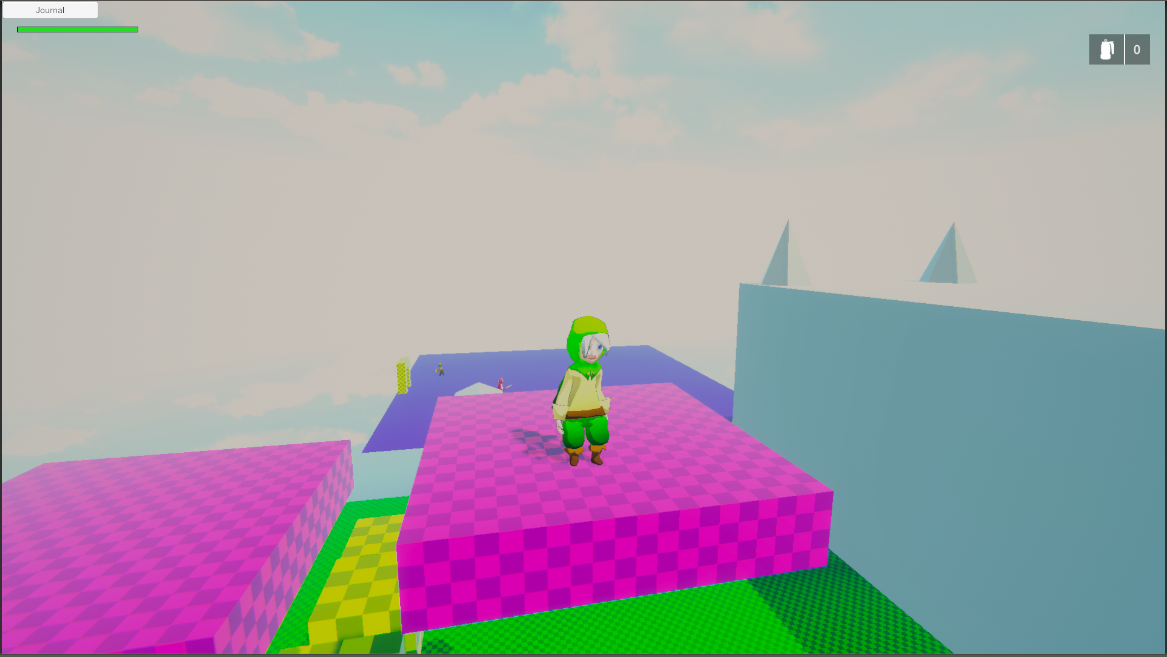
Phae Project Dev Log 4: Changing Render Pipeline and Dealing with scene transitions
Dev Log 4
This week I passed most of my time trying to fix bugs. It takes time to figure out where they come from sometimes and it can be frustrating. Nonetheless debugging is part of game development and it must be done, and sometimes it feels great to find a fix to a bug…other times you might feel a bit dumb though. Everyone makes silly mistakes from time to time.
I also made some pretty big decisions this week. I changed render pipelines to LWRP and I think (not 100% sure yet) that I will development my own item inventory system. I also thought it was time to use a local version control solution for my project, before I make a huge mistake and destroy my progress so far. I finally took the time to add an actual goblin to the game. It’s always good practice to do a bit of everything (code, art, unity, blender, etc..) every week so that I do not fall behind in one aspect of the game or worse forget how to use one of the programs.
Here is the breakdown of this week:
Wednesday : 2h
Forgetting to take my own advice I did not make a build of the game every night. Turns out the game was working in the editor, but when I built the game, the NPC would not give me a quest. I contacted Pixel Crushers asking for help, but so far I was not able to fix the problem.
Thursday : 3h
I looked into maybe changing the from HDRP to LWRP. I think HDRP might be to complex for the type of game I am going for. The only reason I wanted to use HDRP was the VFX editor and maybe the decals. But turns out the VFX editor is coming to LWRP in Unity 2019.1 and I can do without the decals. The advantage I have with LWRP is that the lighting will be simpler to deal with and my game will work on more devices. There is also an asset that I would like to use that will make my game look much nicer, which is Toony Shader 2 (TS2). It has a preview for LWRP compatibility. I did a few tests using TS2 and a VFX asset in an empty LWRP project and I think I can get the graphical results I want from using LWRP.
The thing that made me change my mind was the complexity of the shaders and the lighting in HDRP. So while I was browsing online I stumbled upon this “Boat Attack” demo project made by Unity. I had seen videos of it during the keynote but I guess I forgot about it. After downloading the project (you will need git LFS if you want to download it), I was amazed by the quality of the graphics. The textures are slightly low resolution and there are some small visual glitches here and there but the atmosphere is really nice. It inspired me to plan a beach level in my game because the water shader is so nice.
I will use this demo project to learn more about LWRP especially the scripts they wrote to extend the default behaviors of LWRP, for example the reflections on the water.
I think I will make the change to LWRP as soon as possible, at least I now I know I should not take to much time tweaking the graphics in my HDRP project. I’ll focus on mechanics and learning how to us the third party assets for now. I’ll make the change to LWRP before I make any major development. Since I plan to have a working prototype by end of March I think I should make the change to LWRP before mid February.
Friday : 9h
After a few more emails back and forth the people at Pixel Crushers I finally got the build to work with the Quests. It turns out the problem was coming from having two objects with the tag “Player”. The reason I had two was that my collider (child of the player character) was tagged player. I was using it to trigger OnTriggerEvents by checking that tag. After replacing it by the tag “PlayerCollider” everything worked out fine.
I also added the UI from the TPC demo, It was mostly to have a way to see my character health points easily. I haven’t modified the UI at all yet because I need to figure out how I want to lay it out first. I’ll probably want to show a mini map, health/exp bar, quick item and weapon switch on the UI, maybe more. I’ll design the UI another time.
I thought it was time that I looked into scene management. So I made a door with a trigger collider, with a script attached that would load a new scene. I then put everything I wanted to keep in between scenes under a empty game object and added a “DontDestoyOnLoad” script to it. When I go trhough the door the scene changes but I get errors all over the place because of the scripts in TPC. So I went to the forums to ask for help. I am most likely doing this the wrong way.
In the mean time I can do other things. For example set up a version control for my project. I think it is about time. I don’t want to make a huge mistake that destroys my entire project, without a way to go back. So I followed this tutorial, which seemed to be good.
In my project folder I added the .gitattributes and .gitignore files and wrote the usual git commands with the addition of the git lfs command in the command line:
Git init
Git lfs install
Git add .
Git commit -m “initial commit”
Since the project is pretty big, because of all the third party assets I downloaded, I won’t upload it online to a remote. I will keep it local, at least for now. I’m used to the command line but for a project this big I think it will be easier to visualize by using a git client. So I downloaded Source Tree, which seems to be popular.
Turns out I still had some free time so I ended up changing the project to LWRP right away. It took some time to get all the materials and shaders to work, but there were not that many so it was fine. Since I changed the render pipeline I took the time to set up the lighting and the post processing for my scene. I looked at all the lighting settings in the Boat Attack demo and kind of made mine similar. It does not really fit my game just yet but it definitely is an improvement. It is kind of washed out though… I will tweak things as I go.
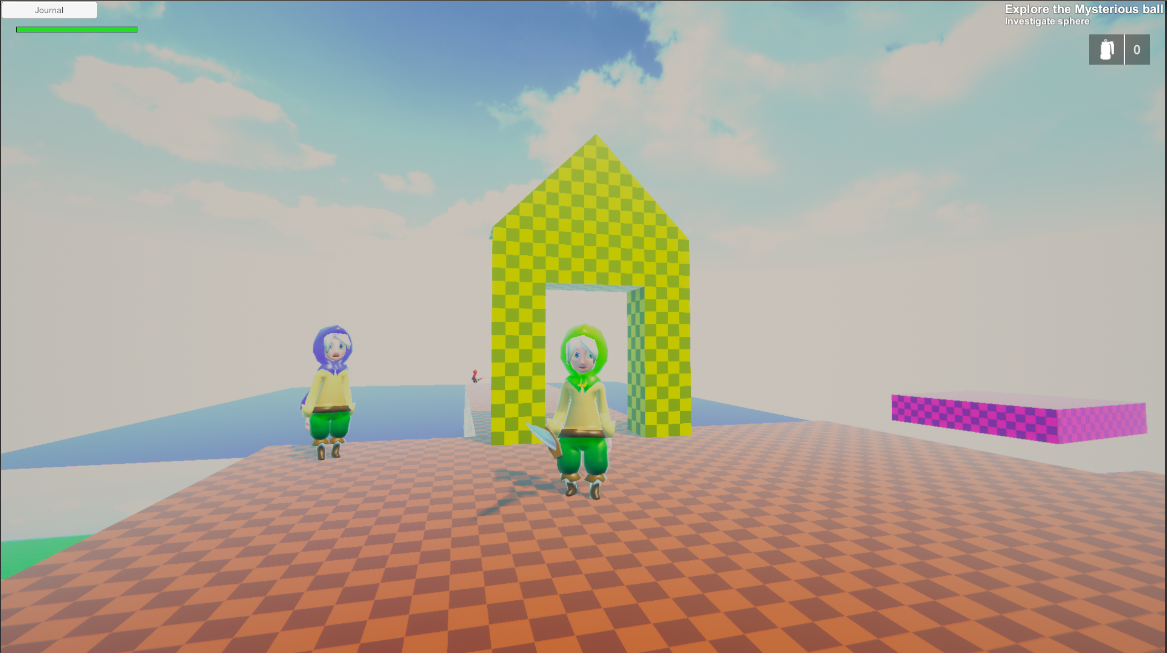
And now that I have the LWRP set up I can use the TS2 shader I was talking about. The features compatible with LWRP are still quite limited but I can still get a nice result. Here you can see the difference:
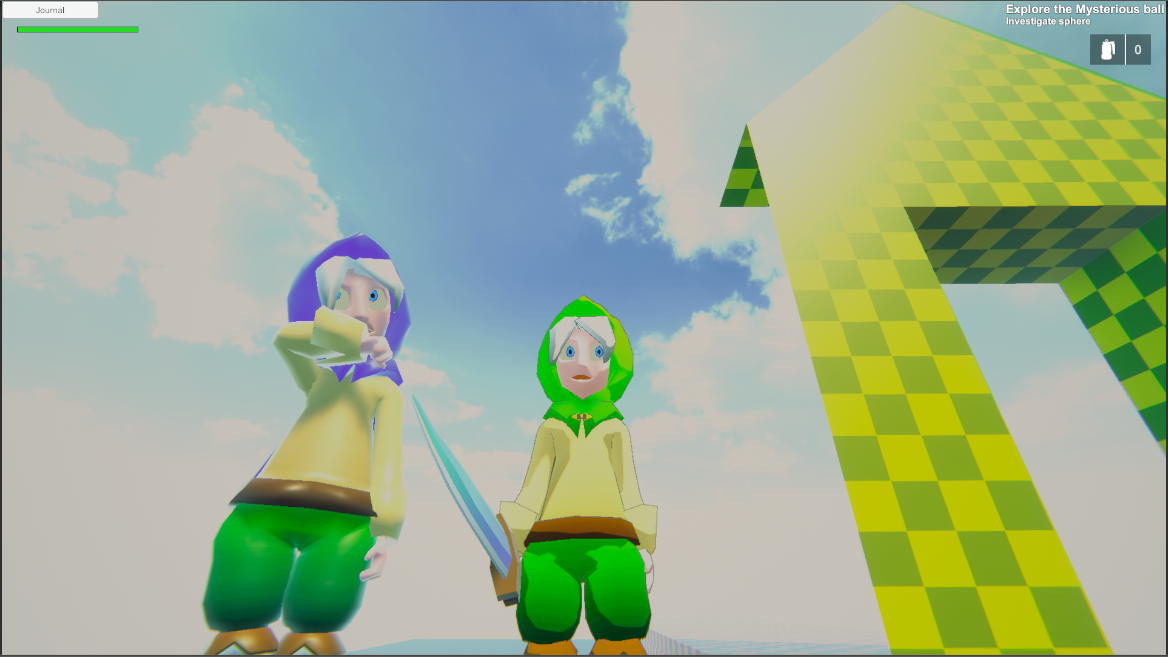
I am eager to see all the TS2 features getting added so that I can make some really nice looking toon characters. I like the toon shading with the texture gradient technique I used for the character. I makes it toony but without the completely flat colors we usually see.
Saturday : 9h
Today I have been working out how I’ll deal with scene transitions. There are many ways to deal with persistent data during scene transitions. I decided to go with the option of having each scene have the world, the main character and some game managers. This enables me to connect the character instance, to any scripts that needs its reference, directly in the inspector. It also makes the game easier to debug because each scene it self contained. There are a few gameObjects that cross in between scenes though. These are the Dialogue Manager, the Quest Manager and the Music manager. I might end up having more manager cross scenes later on. They all have good reasons to be set as “DontDestroyOnLoad”.
- Dialogue Manager: It not only contains the dialogues database (conversation, variable, etc..) but it also contains all the save data for the game. The save data management from Dialogue System is simple to use and will be perfect for my game.
- Quest Manager: It has the quest machine database, which is essential to maintain coherence in the quest states while transitioning scenes
- Music Manager: This is needed so that my main background music can continue to play during the transition and not start over every time I move scene.
Now to pass information, like my current health points, from one scene to another, I use the the “Saver” abstract class from PixelCrushers. It has a “RecordData” and “ApplyData” function that can be overwritten to create special classes that can save and load whatever data you need. The great thing about PixelCrushers is that they developed a ton of third party integration for Dialogue System, including one for Opsive TPC. So there is already a class called “UCCSaver” that saves both my characters attributes (health) and inventory.
Once I have these set up in the inspector I can load a scene using the Dialogue System Saver class. It will first save all the data you have specified (attaching the Saver scripts on gameObjects), load the new scene, and then load all the data back to the gameobjects. There is even an option to have a Loading scene and a have an animation (e.g canvas fade to black) on leave and enter scene. The Dialogue System really does a bit of everything. I probably don’t need to worry about saves now because it even has encryption, json or binary serialization and disk or player prefs data storers.
I was able to progress quite a bit, I’ve made a new scene with enemies and the same NPC as before. And I did some testing. There are a few issues with how I’ve set up my quests but nothing major. The other thing bothering me is that even though my sword in saved in my inventory I can’t equip it, I need to read more of TPC documentation.
I also encountered a weird problem with the Unity editor. Not sure when it started but the editor freezes for 10-30s when I enter playmode. Since I made a lot of changes recently I cannot really tell what caused it. Maybe the save data, the change to LWRP or git? I have no idea, but for now I simply turned off the profiler recording, which helped bring the freeze time down.
All this time I was testing the game in the editor using the keyboard and mouse. I forgot about the controller support. Turns out I have a bug with the camera not rotating with the right joystick even though I am pretty sure that I set it up correctly. I hope to fix this and the small quest issues on Sunday.
Sunday : 8h
I started by trying to fix the camera for the Joystick. I think I understand why it does not work but I do not know how to fix it. So I asked help from Opsive. I did fix the quests though, since it was not that hard.
I thought it was time to look into Inventory pro so that I could give my character some currency and item rewards after a quest. When I was trying out the integration demos I run into a lot of scripts with missing behaviours. This is usually caused by the scripting not compiling correctly. Normally the scripts for integrations are encased in a “if defined” statement. The scripting define symbols are set when enabling the integration package. They can also be set manually in the player settings under the “Others” tab. But even though the scripting define symbols were set correctly it still wouldn’t compile my scripts correctly. What I did was right click on the integrations folder and pressed “Reimport” it fixed my problems. I actually had a similar issue with one of the rewired integration scripts for TPC but I didn’t know how to fix it at the time.
I tested out some of the demos and I am not sure I will be using it for my game… It has too many features that do not apply to my game, and except from the database I will probably have to extend all the default behaviors myself. I plan to have some unusual features for my items so it might be better to make it myself from the ground up anyways. There is no inventory pro integration for UCC/TPC and the rewired/dialogue system integration demo are very old and filled with bugs. From what I could read on some forums it seems the developers of Inventory Pro (DevDog) have pretty much moved on to making other assets. I sent them a message, depending on what they answer I’ll decide what I’ll do.
In the meantime I looked into how I could design my own inventory system by extending the extremely limited inventory that UCC provides. It would take a long time to do so but I would get more flexibility.
Monday: 1h
Finally fixed the camera movement for the joystick, turns out it wasn’t a bug it just wasn’t implemented. Knowing that I just added a few lines of code by overriding one of the functions in the base ViewType.
Since I couldn’t add the healing potion, because I don’t have an inventory yet, I added a healing cube instead. It is a simple cube that heals the player when interacting with it. I plan to make that cube a save point later on, once I have things more figured out.
Tuesday: 7h
On Tuesday I made a goblin enemy. I had some issues while making it because I forgot how to setup some of the components for enemy characters. So here is the list of things I did, so that I can go back to it if I ever forget a step:
- Make the character model (preferably using an existing one)
- Unwrap the model and texture using gradient technique
- Add the armature (using the humanoid armature I made previously)
- Import to Unity and set it as a humanoid rig
- Add the materials and make a prefab variant of the model
- Use the TPC editor to set up the character using the correct profile (In this case enemy)
- Add behavior tree and behavior agent
- Repeat steps 1, 2, 5 and 6 for weapon
- Place the weapon under the item bone
- Add/assign a the hitbox collider to Item
- In play mode move the weapon into place and copy paste the values in inspector
The goblin looks kind of weird but again… I’m not very good when it comes to art.
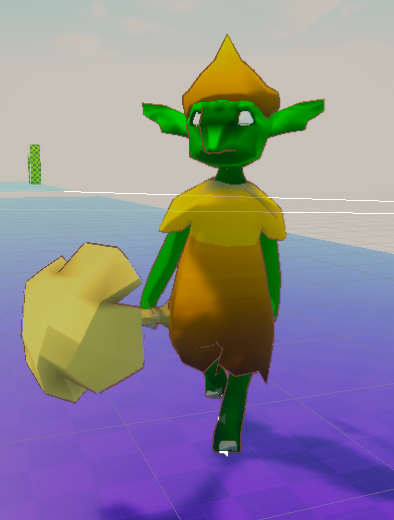
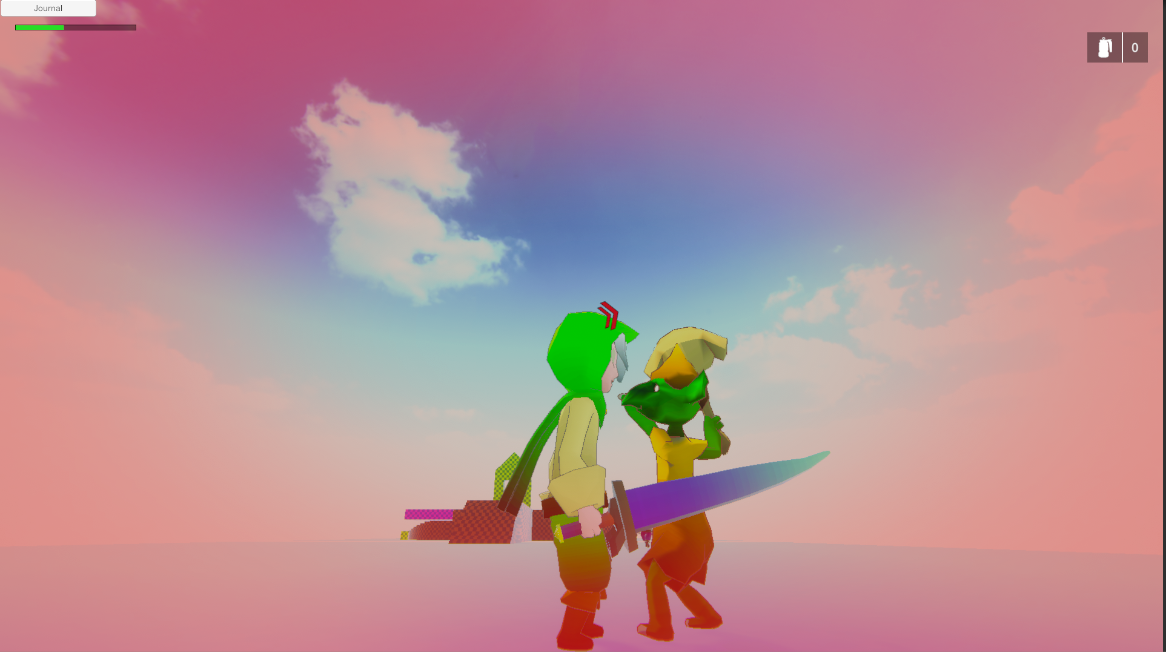
He’s scary when he runs towards you though.
I made a third scene to test out spawning at different spawn points on load scene. This is done using Dialogue System Saver. My only issue currently with scene transitions is that I do not bring over my weapon. The weapon is saved in the inventory during the transition, but the character does not have the weapon spawned in his hand. I will need to write my own script for that since it does not seem to be part of TPC or DS.
I am also looking into how I should design the UI, there are a few things I need to show on the screen at all times and I need a menu which is simple to navigate with both controller and mouse. The menu also depends a lot on the content of the game so I should have an idea of the direction I want to go but I should not start polishing the UI just yet.
Recap: 39h
- Changed to LWRP because it fits my needs more than HDRP
- Added git to my project
- Started testing scene transitions, not finished though
- Using the save features from Dialogue System, it should be good enough for my game
- Made some tests using joystick controller
- Added UCC UI
- Made a goblin enemy
It has now been almost a month that I started working on this game. It has come a long way and I am starting to get an idea of how I’ll structure it. There are a ton of features I want to add but I need a strong foundation first. I do plan to have a working prototype build at the end of March, which hopefully will include most of the combat mechanics. I do want some collecting mechanics like mining, fishing, wood cutting, etc… but that might need to wait for later. And of course the main feature and the focus of the story will be the pet system. I hope to make some AI that makes the pets adorable and very likable. I’ll start developing that part once I am able to make a simple combat mechanic using the next version of TPC, whenever that comes out.
Until next week!