
Phae Project Dev Log 11: Making the LockOn Target scripts
Dev Log 11
As I explained last week I will from now on upload my logs on Mondays to better fit my new work schedule. I now work pretty much full time with my two part time jobs. But it seems that if I work on my game a bit after work and during the weekend I can still progress decently. Of course that’s not something I will be able to achieve every week.
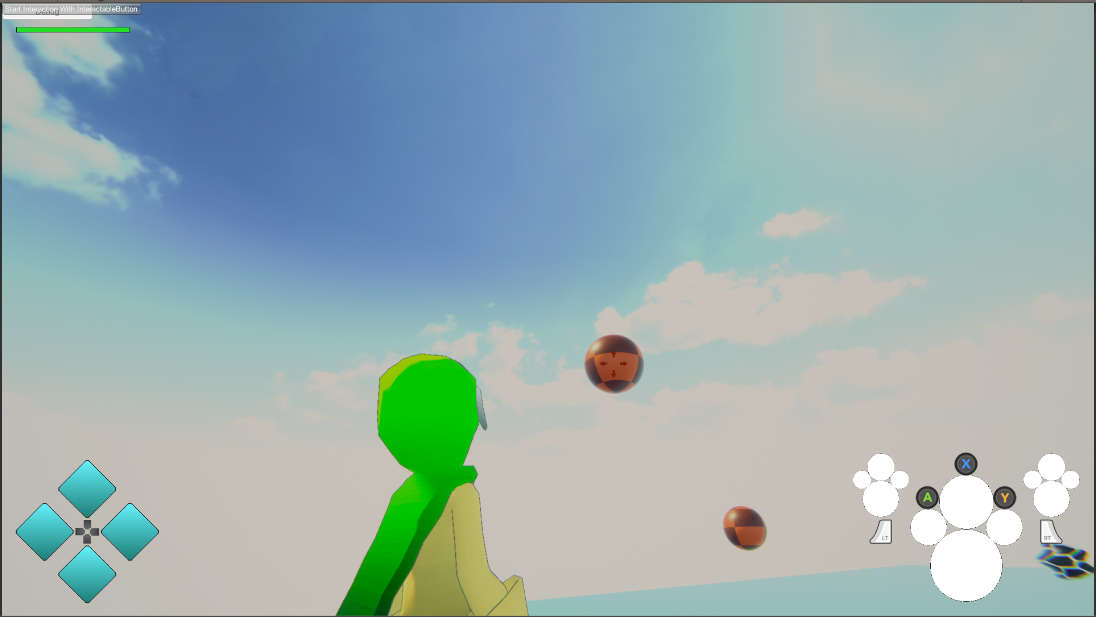
For this week I fixed some bugs, wrote down some ideas and I started working on a LockOn system. The LockOn system will be similar to action JRPGs like Kingdom Hearts or Nier Automata. When locked you can move freely, only the camera follows the target. Eventually I will have the character rotate towards the target whenever he attacks. I haven’t finished implementing the lockOn but I think I am close.
Here is the breakdown of this week:
Wednesday : 2h
On wednesday I was playing around with my game when I came across a weird bug where my character has its feet go through moving platforms. My guess is that the Final IK grounder script might not update at the right time. I wrote a post in the forum about it.

I am also writing a few story ideas for the game. I’m trying to have an interesting story while still keeping the scope of the game quite small.
Thursday : 2h
I think I have a story idea that makes sense with the game loop of explore/collect/craft/fight. It might not be very creative for now but the more I progress in the development the more I can flourish the story. Now I at least have a general idea of who is the main character and what his goal is.
I was also able to fix the weird Final IK grounder making my character go through moving platforms. It turns out I had to add the “MovingPlatform” layer to the grounder solver. If I had known it was this easy I wouldn’t have tinkered with the source code trying to figure out what order the IK/char movement/moving platform movement are updating.
Friday : 2h
I would like to have some sort of minigames when gathering/crafting items. I am thinking of something similar to Fantasy Life on the 3DS. Where depending on how well you do the minigame + your crafting/gathering level you can get upgraded versions of the items.
I need to find a interesting/fun minigame for each collection/crafting “job”. If possible I want it to be slightly more unique to each “job” compared to Fantasy life, where all crafting are almost the same minigame (move left/right, tap very fast, hold, press at the right time). Therefore I started writing down some ideas, which I hope to evolve in the next few weeks, until I finally implement them, once I get the basic combat done.
Saturday : 9h
I finally started working on the locking mechanic that I will use for battle. The way it works is as follows. I have two locks: automatic LockOn and manual LockOn. Automatic lockOn as it name suggest automatically “soft” locks the target that is closest to the center of the screen. Manual LockOn is triggered by the player and “hard” locks the “soft” locked target. If there isn’t a “soft” locked target it finds the closest target (offscreen) it can find.
I have a LockOn script on my camera that looks through a list of possible targets and selects the one that is the closest to the center of the screen. When doing the selection it does not take into account possible targets outside the camera viewport. The possible target list is updated automatically any time a “LockOn Target” (a Monobehavior I add to any gameobject that can be targeted) is enabled/disabled.
The code looks something for automatic LockOn looks like this:
int targetIndex = -1;
            Vector3 targetViewPortPoint = new Vector3();
            float targetDistancetoCenter = 0;
            Vector3 cameraCenter = new Vector3(0.5f, 0.5f, m_MainCamera.nearClipPlane);
            for (int i = 0; i < PossibleLockOnTargets.Count; i++)
            {
                Vector3 viewPortPoint = m_MainCamera.WorldToViewportPoint(PossibleLockOnTargets[i].transform.position + PossibleLockOnTargets[i].m_Offset);

                //On screen?
                if (viewPortPoint.x >= 0 && viewPortPoint.x <= 1 && viewPortPoint.y >= 0 && viewPortPoint.y <= 1 &&
                    viewPortPoint.z >= m_MainCamera.nearClipPlane && viewPortPoint.z <= m_MainCamera.farClipPlane)
                {
                    if (targetIndex == -1)
                    {
                        targetIndex = i;
                        targetViewPortPoint = viewPortPoint;
                        targetDistancetoCenter = CustomFactoredDistance(targetViewPortPoint, cameraCenter);
                        continue;
                    }

                    float possibleTargetDistance = CustomFactoredDistance(viewPortPoint, cameraCenter);
                    if (possibleTargetDistance < targetDistancetoCenter)
                    {
                        targetIndex = i;
                        targetViewPortPoint = viewPortPoint;
                        targetDistancetoCenter = possibleTargetDistance;
                    }

                }
            }
            if (targetIndex == -1)
            {
                m_CurrentTarget = null;
            }
            else
            {
                m_CurrentTarget = PossibleLockOnTargets[targetIndex];
            }
The CustomFactoredDistance function is used to give more or less importance to an axis. For example I give more importance to the X axis than the Y axis, the Z axis is even less important.
//targetDistanceFactor is Vector3(1,0.1f,0.01f).
float CustomFactoredDistance(Vector3 pos1, Vector3 pos2)
        {
            pos1 = new Vector3(pos1.x * targetDistanceFactor.x, pos1.y * targetDistanceFactor.y, pos1.z * targetDistanceFactor.z);
            pos2 = new Vector3(pos2.x * targetDistanceFactor.x, pos2.y * targetDistanceFactor.y, pos2.z * targetDistanceFactor.z);

            return Vector3.Distance(pos1, pos2);
        }
For Manual LockOn I simply have a boolean that changes whenever the player presses a button or when the target has been disabled. When manual lockOn is active I stop the automatic LockOn.
I am going for a result similar to a KingdomHearts or Nier Automata.
Once manual LockOn is active I need to change the camera so that it rotates to face the enemy, while keeping the character in screen. After looking at the different camera option with cinemachine I couldn’t find something that suited me. So I tried to write my own cinemachine extension.
After a few hours I got something that does not work well. I made a post on Unity Cinemachine to ask for help. Hopefully I will get an answer soon. Anyways I will continue to work on it on Sunday, maybe I’ll figure it out on my own.
Sunday : 5h
On Sunday I continued working on the manual lock camera script. It is better than before, but I wish I had more control or at least that the result could be more predictable. I added a few options like speed, dampSpeed, threshold for both x and y axis. But somehow I still get weird jitters sometimes.
I think it will do for now, I will wait for an answer from the unity forum before I try improving it more.
Monday: 4h
I got no answer from the unity forums so I guess I’ll have to improve my current solution by myself. First of all I changed the execution order of the lockOn script so that it would update after cinemachine.Brain. This is to make sure the cursor stays on top of the target by not moving the camera after the cursor is drawn.
After researching a bit more how the lockOn worked in NierAutomata by playing the game and testing things I realised the cursor is in fact drawn on top of everything even the character. I also realised that the camera no longer rotates around the character, instead it rotates around a point in between the character and the target. That point is always at least close enough to the character so that he/she stays in view for any rotation of the camera.
I added a LockOn Pivot point similar to the one explained above. I believe I am very close to replicating their system except for my camera transitions and that it jitters like crazy in some occasions.
I made a video showing the current result:
Recap: 23h
- Fixed weird bug with character feet going through moving platforms
- Wrote down some ideas for a new story
- Wrote down some ideas for gathering/crafting minigames
- Started working on the LockOn system
I am happy that I can still progress decently even though I have less time to work on my game. I will have to implement things piece by piece. I want to break down every feature in small pieces that I can implement every weekend. This way I will really feel that I am progressing. Currently I am working on the combat. I broke down the combat in small pieces: LockOn system, attack rotate towards enemy, stats (attack,defence) affect damage, enemy knockback, enemy AI, etc…
Next week I hope that I’ll be able able to fix the jitter and transition problem with the camera. If I cannot do it, I should probably leave it and come back to it later with a fresh mind.
Until next week!