

VFX: Controlling particles with windzones
Making special effects in unity is very simple. But sometimes you which you could push of move partciles away from their default path. There are two ways to do so. Either write a script that modifies the position of each particle in your particle system, or you can activate the “External Forces” module and use windzones.
Here is a simple example how to create a script that makes your particles seek a target transform.
using System.Collections;
using System.Collections.Generic;
using UnityEngine;

public class ParticleSeek : MonoBehaviour
{
    public Transform target;
    public float force = 10.0f;

    ParticleSystem ps;

    void Start()
    {
        ps = GetComponent<ParticleSystem>();
    }

    void LateUpdate()
    {
        ParticleSystem.Particle[] particles =
            new ParticleSystem.Particle[ps.particleCount];

        ps.GetParticles(particles);

        for (int i = 0; i < particles.Length; i++)
        {
            ParticleSystem.Particle p = particles[i];

            Vector3 particleWorldPosition;

            if (ps.main.simulationSpace == ParticleSystemSimulationSpace.Local)
            {
                particleWorldPosition = transform.TransformPoint(p.position);
            }
            else if (ps.main.simulationSpace == ParticleSystemSimulationSpace.Custom)
            {
                particleWorldPosition = ps.main.customSimulationSpace.TransformPoint(p.position);
            }
            else
            {
                particleWorldPosition = p.position;
            }

            Vector3 directionToTarget = (target.position - particleWorldPosition).normalized;
            Vector3 seekForce = (directionToTarget * force) * Time.deltaTime;

            p.velocity += seekForce;

            particles[i] = p;
        }

        ps.SetParticles(particles, particles.Length);
    }
}
But here we are going to focus on external forces and windzones. Here I am going to explain how I achived the effect below:
I have two spheres and a particle system. Each sphere has a spherical windzone attached to them. And the particle system only renders trails and is affected by external forces. Sphere 1 (on the left) has a weaker wind force than sphere 2 (on the right). The particle system origin is the center of sphere 1.
First we make the particle system:
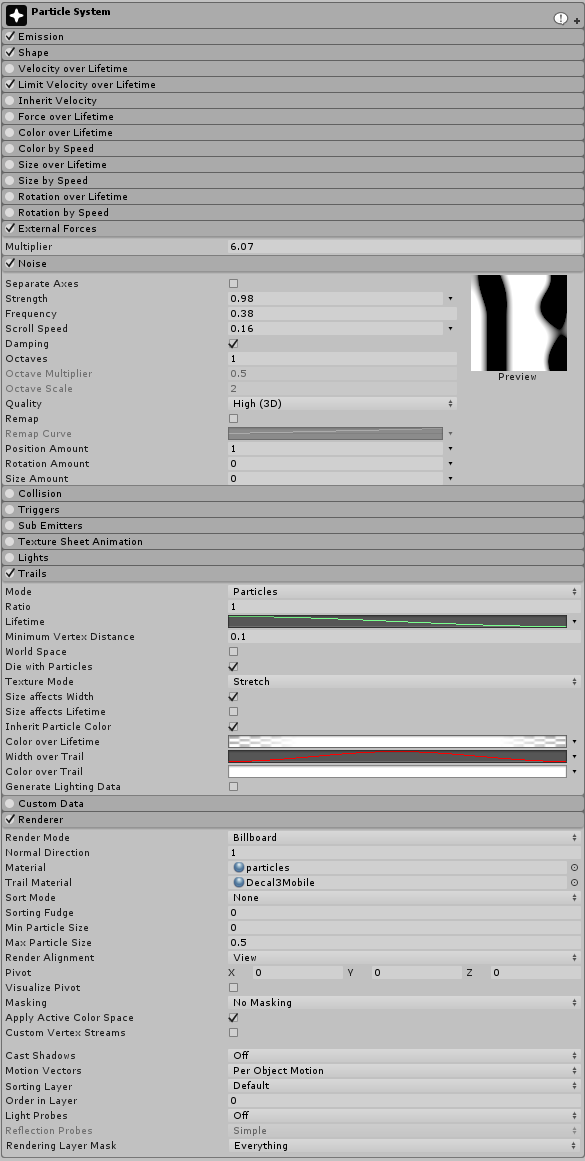
As you can see the modules “External Forces” and “Trails” are active. Note that the Trail Material is set in the “Render” module, here I am using a custom shader but any trail shader will do. The “Noise” and “Limit Velocity over Lifetime” are not necessary but they give the a effect a smoother feel. The shape of the particle system is of course a sphere.
Now that the particle system is set to be affected by external forces we can set up our windzones. Windones can either be “Directional” or “Spherical”

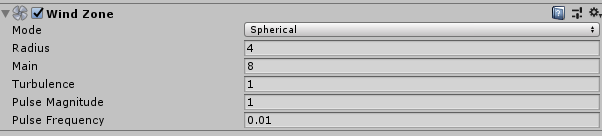
- Mode:
- Spherical: Wind zone only has an effect inside the radius, and has a falloff from the center towards the edge.
- Directional: Wind zone affects the entire scene in one direction.
- Radius: Radius of the Spherical Wind Zone (only active if the mode is set to Spherical).
- Main:
- Turbulence:
- Pulse Magnitude:
- Pulse Frequency:
Read more about wind zones in the Unity documentation here
For wind specifically for the terrain system, the documentatio is here